Showing posts with label iphone apps. Show all posts

Wednesday, August 24, 2011

I Heart Nerds!

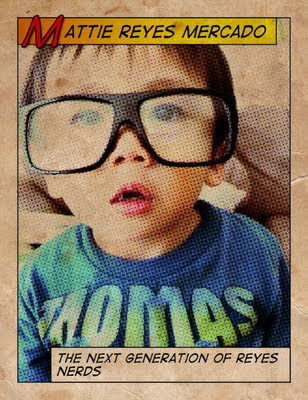
Remember this picture?


You'd think that:


1) having spent most of my teen years wearing glasses and braces and...


2) getting teased for said appearance plus ..


3) having good grades would've prevented me from dressing up my kid as a geek. But I just can't help it.

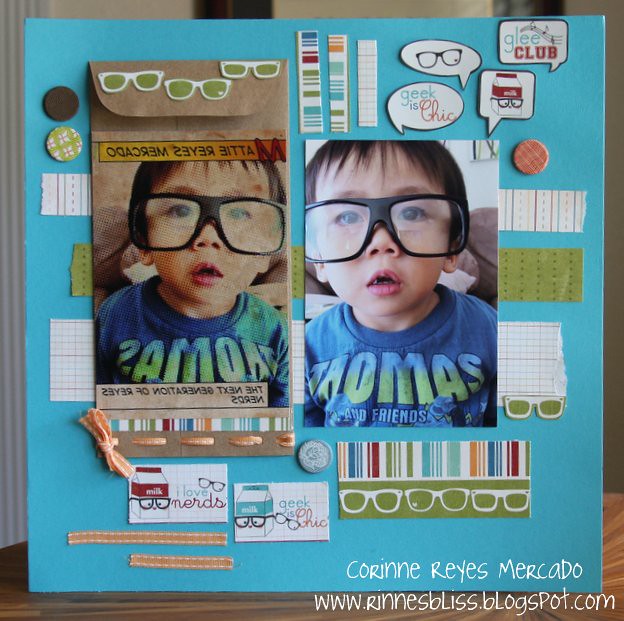
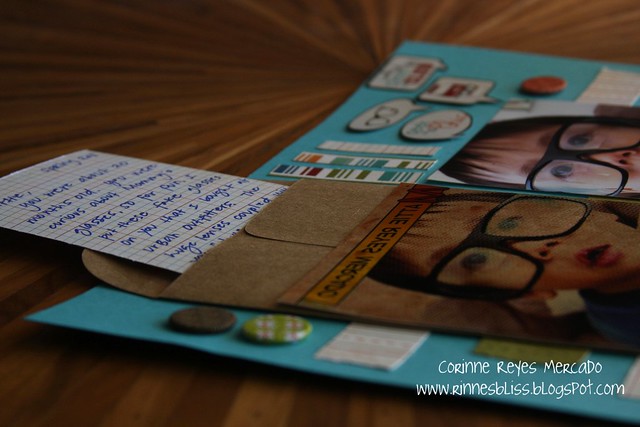
It's one of my favorite pics of MK, and certainly one of my most featured photographs here. I finally decided to scrap it when I saw the perfect line at my LSS. Just look at all of the Geek is Chic galore from Imaginisce down below. That's right. Yay for the underdogs! I'm proud to have been/ still be a nerd!
IMG_2027

I added an envelope from a Basically Bare album and tucked in a note. It basically stated how MK put on my new, fake Urban Outfitters frames after he saw me putting my glasses on. He instantly became my nerdy tater tot!
IMG_2030

The cardstock is from Bazzill. I also added brads from American Crafts and a miscellaneous ribbon.

The pic on the right was the original, and the one on the left is enhanced using the Half Tone app (see my iPhone apps post). Speaking of iPhone apps, these photographs came to my door by way of postal pix. You choose which mobile pictures and which sizes to buy all by just clicking away on your phone. Some pics did come out cropped wrong and this one was printed backwards. But other than that, I'd recommend them. They made it very convenient! I think I'll be scrapping more!

Onto my 30 Day Photo Challenge from Oh So Lovely:


(Shown backwards)


Day 23- Sunset. I was thinking of cheating and putting in the sunset beach picture I took in Hawaii but I guess this is pretty too.


Day 22- Trees.


Day 21- Cool pattern.


Day 20- What I read. Yes, I know...that is from my phone. I do miss flipping the page of a real book.


Day 19- Where I slept.


Smooches!


P.S. Amy, I'm sure you'll love that cut-out on the very top right of the page of my lay-out. :) :) :)


Tuesday, July 19, 2011

iPhone Photos.

I am a HUGE fan of Ree Drummond, The Pioneer Woman. I adore her style of writing. I am addicted to her way of blogging. Man, I salivate at all of her recipes. And I especially love her photography. It's no wonder that her blog is among the most popular.

So when one of her photography contests included phone pictures, I jumped at the chance. Usually, the people who submit entries are professionals. But I thought a regular person like me could enter this one.

And you know what? As of now, there were 215,000 submissions and two of mine got picked to be showcased on her blog!!! YIPPPPPEEEEEEEEEE!!!! I am so honored and excited!

You could view the first one on her Group 2 set. And the second pic on her Group 4. Both are under my flickR account: Bliss8D. There is a total of five groups and then she announces her favorites and then the winner.

Of course, there are so many beautiful pictures. I don't think I have a chance of winning. But am just ecstatic that two made it to the 'semi-finals.' Woot-wooooo!!!

On a previous note, I talked about how I'd write a post on my favorite phone apps. I'm not saying I'm an expert at all. But I do have a lot of photo apps so I thought I'd do some mini-reviews. Plus, people often ask about what I use so thought it's a perfect time to describe them here. I have an iPhone but I'm sure there are similar apps with the other phones.

The app that turns pics into the grainy, comic-strip images are from Half Tone. It is very cool, and at $0.99, it is well worth the price. You could even write your own captions.


My other favorite is Picture Show. I found out about it through a friend who's a professional photographer. It gives lots of different choices when enhancing mobile pics - makes them look vintage, grainier, faded, toned with different colors. It is $1.99.


I also recently discovered Tilt Shift Gen. It allows you to pinpoint one part of the photo to be clear, and create bokeh (blurs out) with the rest. I really like the cool effects of this. There's a free version, and then there's also a $0.99 one. I don't remember which one I have :).


There's a photobooth app, and it allows you to pick multiple pics to create strips. It's called my PB v2.1. I can't seem to find this version in the app store to tell you the price. But as you can see, it's a bit smaller than the other photos and sometimes comes out blurry.


Pano is an app that allows you to take multiple pics and turn them into one panoramic photo. The outcome is awesome but the process is fairly difficult. You have to make sure you know where one pic ends in order to create a smooth 'seam.' Sometimes, that's not so easy especially when you're outdoors and the sun is shining brightly on your phone. It's $1.99.


Those are the ones I use the most. There's also Adobe Photoshop Express. It's free and I mostly use it to crop pics. I also have Camera Bag, which is similar to Picture Show but doesn't have as many effects. It's $1.99.

Hope this was helpful to you iPhone users! Have a great one! Oh, and wish me luck on the mobile photography contest :).